
Blender for MAC
Free, open-source 3D suite for modeling, animation, rendering, visual effects and video editing.
Blender Overview
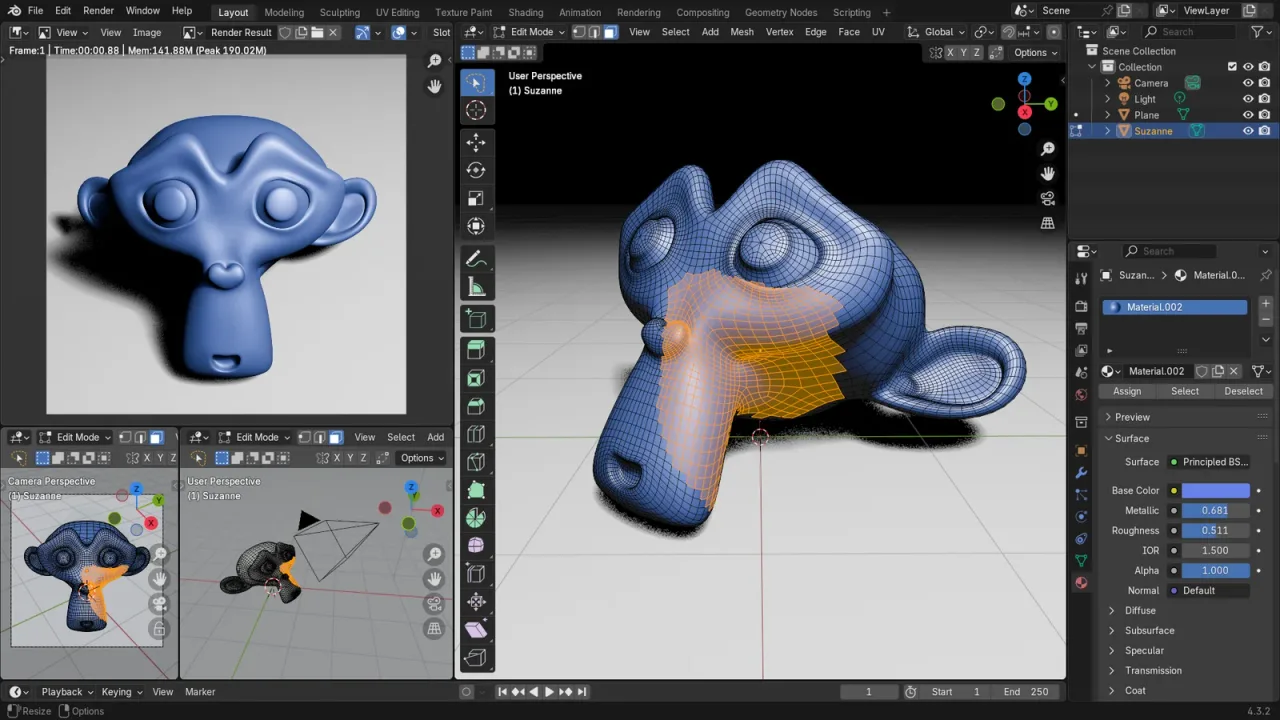
Blender is a free, open-source 3D creation suite. In one app it covers modeling, sculpting, texturing, rigging, animation, simulation, rendering, compositing, motion tracking and even video editing, and it is used by hobbyists, studios, game developers and architects around the world. Blender is developed by the Blender Foundation and a large community, and released under the GPL license, with no subscriptions or paid features.
Blender 5.2 is a Long-Term Support (LTS) release that receives fixes until July 2028, which makes it a safe choice for long projects. The current Mac version is built for Apple Silicon and needs macOS 13 (Ventura) or later; it renders on the Mac's GPU through Apple's Metal.
Key Features
Blender takes a project from the first shape to the final rendered image or film.
- Modeling and sculpting: polygon modeling with modifiers, and a sculpt mode with dynamic topology and multiresolution for detailed characters.
- Geometry Nodes: build procedural models, scatter objects and create effects with a node system.
- Rendering: Cycles, a path tracer for realistic images, and EEVEE, a real-time renderer, both using Metal on Apple Silicon Macs.
- Animation and rigging: keyframes, armatures, shape keys, constraints and drivers for characters and objects.
- Grease Pencil: draw and animate in 2D directly inside the 3D scene.
- Simulation: cloth, hair, fluids, smoke, fire and rigid bodies.
- Visual effects: camera and object tracking, masking and a node-based compositor.
- Video editing: the Video Sequencer cuts and combines video, audio and effects.
- Python scripting and add-ons: customise Blender and add new tools.
What’s New in Version 5.2.2
Blender 5.2.2 is a bug-fix update of Blender 5.2 LTS, which brought:
- Node-based physics with new cloth and hair dynamics and an XPBD Solver node
- Audio-reactive Geometry Nodes that respond to imported sound
- A Mesh Bevel node for procedural bevels
- Online asset libraries for materials, HDRI worlds and node setups
- EEVEE about twice as fast in scenes with many instances, with less banding
- A Texture Cache in Cycles that lowers memory use, and a Thin Wall mode for paper and thin glass
- 35 new compositor nodes and new Video Sequencer features
- Long-Term Support with fixes until July 2028
Blender FAQ
Is Blender free for Mac?
Yes. Blender is free and open source, released under the GPL license, for personal and commercial work. There are no subscriptions or paid features.
Does Blender run on Intel Macs?
The current Blender for Mac is built only for Apple Silicon Macs. On an Intel Mac, use Blender 4.5 LTS, the last version made for Intel Macs, from Blender's download archive.
Which macOS version does Blender need?
Blender 5.2.2 needs macOS 13 (Ventura) or later on an Apple Silicon Mac.
What does LTS mean in Blender 5.2 LTS?
LTS stands for Long-Term Support. Blender 5.2 LTS receives bug fixes until July 2028, while new features go into the next versions, such as Blender 5.3.
Does Blender use the GPU on Apple Silicon Macs?
Yes. Both the Cycles and EEVEE renderers use your Mac's GPU through Apple's Metal, which makes rendering much faster than on the CPU alone.
Can I use Blender for commercial work?
Yes. Everything you make with Blender, such as models, images, animations and games, belongs to you and can be used commercially.
Is Blender good for beginners?
Blender has many tools, so it takes time to learn, but its free official manual and a large number of tutorials make it one of the easiest 3D apps to learn on your own.
Is Blender safe to install on a Mac?
Yes, when you download it from the official website, blender.org, which is where the download button on this page leads. Blender is open source and blender.org publishes checksums for every download.
How do I update Blender on my Mac?
Download the latest version from blender.org and replace the old copy in your Applications folder. Blender asks whether to copy your settings from the previous version the first time it starts.
Where does the Blender download on blender.FULLMAC.app come from?
The download button leads to Blender's official download page at https://www.blender.org/download/. blender.FULLMAC.app does not change or repackage the installer.
Similar Apps
 Preview3MFPreview3MF is a free, open-source Quick Look extension for .3mf files, the 3D Manufacturing Format used by 3D-printing slicers. Select a .3mf file in Finder, press Space and you get a real 3D preview of the model, rendered with lighting, shading and materials, which you can orbit and zoom with a mouse or trackpad. It also adds proper Finder thumbnails for .3mf files, reusing the slicer's embedded preview image when there is one and rendering the model itself when there is not. You do not need to open Bambu Studio, PrusaSlicer or OrcaSlicer just to see what a file contains.Graphic Design
 Wings 3DWings 3D is an advanced subdivision modeler that aims to be both powerful and easy to use. It was inspired by Nendo and Mirai from Izware, and offers a wide range of modeling tools, a customizable interface, support for lights and materials, and a built-in AutoUV mapping facility. It concentrates on modeling: Wings 3D has no support for animation. Its import and export plugins cover formats such as OBJ, 3DS, PLY, glTF and Collada.Graphic Design
 FreeCADFreeCAD is a free parametric 3D modeler for designing real-world objects of any size, from small parts for 3D printing to machines and buildings. Parametric means your model is built from a history of steps and dimensions, so you can change a measurement later and the whole model updates. FreeCAD has workbenches for part design, sketching, assemblies, technical drawings, simulation (FEM), CNC machining (CAM) and architecture (BIM), and it opens and saves standard formats such as STEP, IGES, STL and DXF.Graphic Design
 ItsPaintItsPaint is a small paint and markup app for the Mac, built around a simple job: take or paste a screenshot, number the steps, point at things and drag the finished image into a bug report or a document. Its developer sums it up as MS Paint for the Mac. It marks up images with numbered step badges, arrows and callouts, a highlighter, pixelation and a spotlight that dims everything outside a box, and it paints too, with thirteen tools including pencil, brush, eraser, clone, fill and Instant Alpha selection.Graphic Design
 BirdfontBirdfont is a font editor for Mac that lets you create vector graphics and export them as TTF, OTF and SVG fonts. It supports both monochrome and color font formats, so it suits ordinary typefaces as well as color fonts. Its release notes describe a dedicated ligature tab, spacing classes, anchor glyphs, a color wheel, and the option to import another font and merge it with the one you are working on.Graphic Design
 SeashoreSeashore is an easy-to-use image editor for macOS with support for layers. Its developer describes it as a light GIMP or Photoshop, with most of the features non-professionals need to create images. It has brushes, a pencil, an eraser, clone and smudge tools, gradients, a fill bucket, a text tool, cropping and several selection tools, plus effects such as blur, bloom and crystallize.Graphic Design
FULLMAC.app does not host this app. Download buttons lead to the developer’s own pages.